

We've all been there. You land on a website, look for something simple like prices or opening times, and can't find it. The menu has 14 options, half of them sound the same, and the page you need is hiding in the footer, so you give up and go elsewhere.
Most websites don't start out like this. They get that way one page at a time, because nobody planned the structure at the start. Before any page is designed, there's a bigger question: which pages does your website need, and how will visitors navigate between them?
What do we mean by site structure and navigation?
Site structure is how the pages on your website are grouped and organised. Think of it like the layout of a shop: which aisle holds what, and which products sit together.
A sitemap is the plan of that structure. It's a simple diagram showing every page on your site and how they connect, a bit like a family tree.
Navigation is how people move around your site: the main menu, the footer, buttons and links within pages.
Why your website's structure matters
It's easy to see structure as a back-office job that nobody notices. In reality, it affects three things every business cares about.
Your visitors find what they need (and stay)
People don't read websites from top to bottom. They arrive with a job to do, such as checking a price, booking a stay or getting a quote. If they can't see where to go within a few seconds, many won't hang around to work it out.
Even big brands get this wrong. In its 2025 review of more than 180 leading US and European online shops, UX research firm Baymard Institute rated the navigation on 58% of desktop sites and 67% of mobile sites as "mediocre" to "poor". In its testing, people started to feel overwhelmed when shown more than about 10 options at once.
Search engines understand what you offer
Search engines use your site's structure to work out what your business does and which pages matter most. A clear, logical setup makes it easier for your important pages to show up in search results. It also helps you build what SEO experts call topical authority: being recognised as an expert in your subject.
Your website can grow without becoming messy
A site planned around today's five services can quickly get messy when you add a sixth, then a seventh. Planning with growth in mind means new pages slot in naturally, instead of being bolted on wherever there's room.
Start with your customers, not your org chart
The most common mistake we see is a website organised the way the business sees itself: by department, by internal team name, or by the jargon used in the office.
Your customers don't think like that. They think about the problem they want solved.
For example, a heating engineer might describe one of their services as "planned preventative maintenance". Their customers just want to "get my boiler serviced". If the menu uses the first phrase, many visitors won't realise it's what they're looking for.
Before you plan anything, ask yourself:
- Who do we want to visit our website?
- What are they trying to do when they arrive?
- What words would they use to describe what we offer?
If you're not sure, ask your customer service team if you have one. They hear customers' questions, in customers' own words, every day.
How to plan your site structure in five steps
Step 1: List everything your website needs
Start by writing down every page you have now, plus anything that's missing. Think about your services, products, locations, prices, team, reviews, FAQs and contact details.
Don't worry about order yet. This is just a list. If you have an existing website, it's a great chance to spot pages that are out of date, no longer required, or say the same thing twice.
Step 2: Group pages the way customers would
Write each page on its own note, then sort them into groups that feel natural. You'll quickly see where people agree and where they get stuck. Web designers call this "card sorting", and it's one of the simplest ways to see your website through your customers' eyes.
Step 3: Give each group a clear name
These group names often become your main menu, so keep them short and obvious. "Services", "Pricing" and "Contact" work because everyone knows what they mean. Clever or quirky labels might sound fun in a meeting, but they make visitors stop and think, and that's when they leave.
Step 4: Sketch the structure
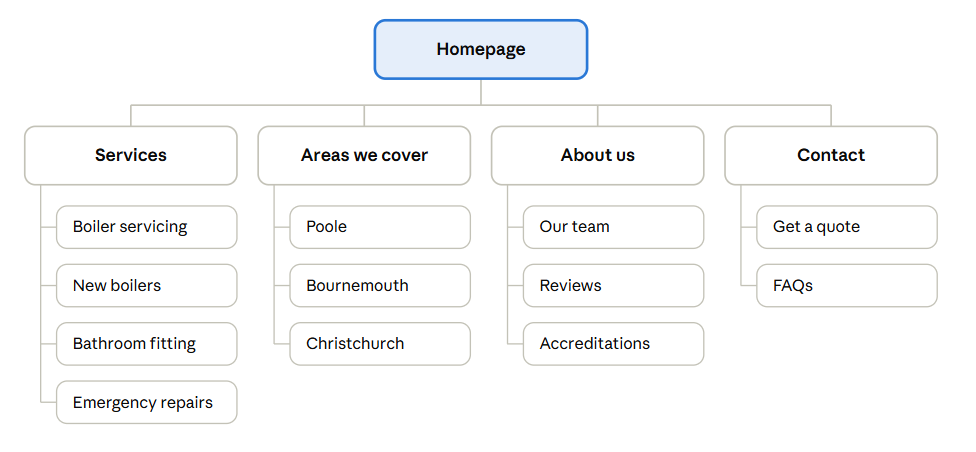
Now draw it out. Your homepage sits at the top. Your main groups sit underneath. The individual pages sit under each group. Here's a simple example for a fictional plumbing and heating business:
In this example, every page sits under one of four sections, and none is more than two clicks from the homepage.
Step 5: Test it before anything is built
Once you have a draft, test it. Give a few people a simple task, such as "Where would you go to book a boiler service?" and ask them to point to where they'd click on your sketch.
If they hesitate or pick the wrong section, your structure needs tweaking. This is often called "tree testing" and it helps catch problems whilst they're still quick and easy to fix, rather than after your new site has gone live.
Getting your menu right
Your main menu is the signpost for your whole website. A few simple rules go a long way.
- Make every option distinct. If two menu items could hold the same page, visitors won't know which to pick. "Services" and "What we do" side by side is a classic example.
- Use everyday words. Label things the way your customers would say them, not the way you'd describe them in a business plan.
- Put the important stuff first. People tend to notice the first and last items in a menu most, so put your key pages there.
- Use the footer for the extras. Things like privacy policies and terms belong at the bottom of the page, not in the main menu.
- Plan for mobile from the start. On a phone, your menu usually folds away behind a button. Check that the most important pages are still easy to reach, and that people can always find a way to contact you. Our post on mobile-first web design covers this in more detail.
How many layers should your website have?
Think of your website's layers like floors in a building. The more floors, the more stairs people have to climb to find what they need.
A flat structure has only a few layers, so most pages are just a click or two from the homepage. A deep structure has lots of layers, with pages tucked inside sections inside other sections.
For most small and medium-sized businesses, flatter is better. A good rule of thumb is that your most important pages should be no more than three clicks from the homepage.
That doesn't mean cramming everything into the main menu. Larger websites, like online shops with hundreds of products, naturally need more layers. The key is making each layer obvious, so people always know where they are and how to get back.
How site structure helps your SEO
- Tidy web addresses. When your structure is clear, your page addresses follow it naturally. For example, yoursite.co.uk/services/boiler-servicing tells both people and Google exactly what the page is about.
- Linking related pages. Pages that link to each other, such as a service page linking to a related case study, help Google understand how your content fits together. They also keep visitors on-site.
- Breadcrumbs. These are the small trails of links near the top of a page, like Home > Services > Boiler servicing. They show visitors where they are and help Google understand your site.
Common mistakes to avoid
- Too many menu items. If everything is important, nothing stands out.
- Jargon and in-house names. If your customers wouldn't say it, don't put it in the menu.
- Pages that overlap. Two pages covering the same thing confuse visitors and can compete with each other in Google.
- Orphan pages. These are pages that nothing else links to. If visitors can't reach a page, it might as well not exist.
- Hidden contact details. Whatever else you do, make it easy for people to get in touch.
- Directly copying a competitor. Their structure was built for their customers and their services. It might not suit yours.
Plan for where your business is going
Your website should fit your business as it is today, with room for where it's heading.
If you're planning to add new services, move into new areas or target new types of customer, think about where those pages would go now. It's much easier to leave space in your structure than to squeeze things in later.
It's also worth reviewing your structure every so often, especially when your business changes direction. If your menu no longer matches what you actually sell, it might be time for a rethink. Our post on why most businesses should refresh their website every four to five years explains the signs to look out for.
One word of warning: if you restructure an existing website, page addresses often change. Without the right redirects in place, visitors and Google can end up on broken pages, and you can lose search rankings you've built up over years. This is a job for your web developer, so make sure it's part of the plan.
Get your structure right from the start
A great-looking website built on a muddled structure will always struggle. A clear, well-planned structure makes everything else easier: the design, the content, your SEO and, most importantly, your customers' experience.
At b4b, planning your site structure is part of every website project we take on. We'll work with you to understand your customers, map out your pages and make sure visitors can find what they need, before a single page is designed.
Thinking about a new website or a redesign? Get in touch with our web design team or call us on 01202 684400.